int main()
{
  weak_wnd<gui::frame_window> w = create<gui::frame_window>
    ( _title = "Hello World!" );
The weak_wnd<>
and wnd<>
are reference counting smart pointers that holds and manages lifetime of
window objects in user-code. The weak_wnd<> version doesn't give direct access
to the window, and is meant to break cyclic references.
The wnd<>
and weak_wnd<>
have been inspired by boost::shared_ptr
and boost::weak_ptr. Boost smart pointers delete
the holding pointer when the last boost::shared_ptr
referencing it is destroyed. The same doesn't apply to wnd<>, a window resource is only destroyed
when no wnd<> holds it and the window is no longer visible in the
screen, e.g. when the user closes the window.
To get a wnd<>
from a weak_wnd<>
we must lock the weak_wnd<>. Like this:
create<gui::controls::button>
  ( _parent = w.lock(), _text = "Button1"
    , _size = std::make_pair(50, 50)
  );
The _parent parameter receives
a wnd<>
as argument.
Note that though there's no wnd<> holding our frame_window, we didn't
called wait yet, which
means that even with our window lifetime being managed by the user, he
still doesn't have chance to close our window. Then we don't have to check
for w.lock()
returning an empty wnd<>
Then we just call wait and wait, no pun intended, the user to close our window.
  gui::wait();
}
And here we have our first GUI window. 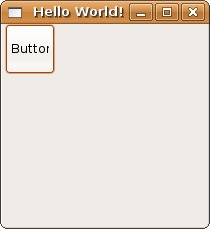
Creating user interfaces aren't only about creating views. Windows must respond to user actions.
In CppGui, all possible user actions are defined as signals and callbacks.
If we want to respond to button clicks, we must connect our handler to the click signal for the button instance we want to respond to.
We will use these directives to ease typing.
[helloworld1_using_directives]
First, we define our handler:
void click_signal_handler(weak_wnd<gui::frame_window> weak_frame
			  , wnd<gui::controls::button>)
{
  gui::wnd<gui::frame_window> frame = weak_frame.lock();
  if(frame)
    frame->close();
}
The handler closes our frame_window, which is received as argument. The other parameter is the pointer to the button to which the handler is registered.
Since we won't use it inside the handler's definition, we make it anonymous to quiet warnings from the compiler.
We could have written our handler with just one parameter and ignore the button pointer that is passed by the signal when binding the handler.
After the button creation, we connect our handler.
 gui::wnd<gui::controls::button>
   btn = gui::create<gui::controls::button>
     ( _parent = w.lock()
, _text = "Button1"
, _size = std::make_pair(50, 50)
     );

 btn->click_signal().connect(boost::bind(&click_signal_handler, w, _1));
It is important that a weak_wnd
is passed instead of wnd,
or else a cyclic reference is created, since boost::bind
gets its arguments by value.
And done. Now our button responds to a button click by closing the window.
Since we don't have any strong references to the frame window, when the button closes it, it is destroyed and then the application exits.
Often enough we want to create a customized class that works like a native widget, but which also has some predefined function and/or customized visual.
We will create a class that represents our main window, with menus. So, we
will subclass from frame_window:
struct main_wnd : gui::subclass<main_wnd, gui::frame_window>
{
First we create member variables to hold our children windows, so that we can use them later to register signals.
wnd<gui::controls::menu> menu_bar;
wnd<gui::controls::menus::text_submenu> file_submenu;
wnd<gui::controls::menus::text_item> open_item, save_item, exit_item;
Then we can customize our widget visual within its constructor.
main_wnd()
{
  wnd<main_wnd> self = wnd_from_this();
When the constructor executes, the widget is already constructed, and can be used freely. This allows to use the constructor for customizing a subclassed widget. This is then the preferred way to subclass a widget in CppGui.
Then we use the wnd<main_wnd>
returned from wnd_from_this
as a _parent argument for
creating the menus.
  menu_bar = create<gui::controls::menu>( _parent = self );
  file_submenu = create<gui::controls::menus::text_submenu>
    ( _parent = menu_bar, _text = "File" );
  open_item = create<gui::controls::menus::text_item>
    ( _parent = file_submenu, _text = "Open" );
  save_item = create<gui::controls::menus::text_item>
    ( _parent = file_submenu, _text = "Save" );
  exit_item = create<gui::controls::menus::text_item>
    ( _parent = file_submenu, _text = "Exit" );
}
We then create the window and run the application:
int main()
{
  create<main_wnd>( _title = "Subclass example" );

  gui::wait();
}
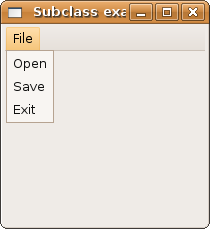
We want our main_wnd widget
to be created with 400x200 pixels of size. But we don't want to rely on our
clients to pass a size argument. We have two options:
Use the resize function-member from window, which is subclassed by frame_window:
resize(400, 200);
Or you can define create parameters using a static function-member called create_wnd:
static void create_wnd(create_params& param)
{
  param.params( _size = std::make_pair(400, 200) );
}
The create_wnd function is
executed by all classes that subclasses in its hierarchy.
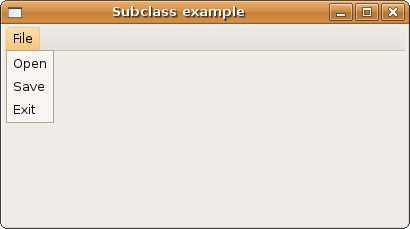
Event classes are classes bound to a window lifetime. You can add event classes to windows and use them in handlers. This easiers decoupling window view with the handling code. It also helps with code locality.
Using event classes for the subclass example:
If we want the event class to connect the signals by itself, the window class must be defined before event class defintion, since we need the event class to be defined prior constructing it, we need to define main_wnd constructor's outside the class definition.
struct main_wnd : gui::subclass<main_wnd, gui::frame_window>
{
  wnd<gui::controls::menu> menu_bar;
  wnd<gui::controls::menus::text_submenu> file_submenu;
  wnd<gui::controls::menus::text_item> open_item, save_item, exit_item;

  main_wnd(); // just declare the constructor.
We then define the event class:
struct events
{
  events(wnd<main_wnd> w)
  {
    w->exit_item->click_signal().connect(w->use_event(&::events::exit));
  }

  void exit(wnd<main_wnd> w)
  {
    w->close();
  }
};
We use use_event function-member to say that we want to use a registered event class. This automatically passes the event class instance registered within the window to the handler.
main_wnd::main_wnd()
{
  wnd<main_wnd> self = wnd_from_this();

  menu_bar = create<gui::controls::menu>( _parent = self );
  file_submenu = create<gui::controls::menus::text_submenu>
    ( _parent = menu_bar, _text = "File" );
  open_item = create<gui::controls::menus::text_item>
    ( _parent = file_submenu, _text = "Open" );
  save_item = create<gui::controls::menus::text_item>
    ( _parent = file_submenu, _text = "Save" );
  exit_item = create<gui::controls::menus::text_item>
    ( _parent = file_submenu, _text = "Exit" );

  add_event_class(::events(self));
}
We add an event class with the add_event_class member-function. The instance is registered by type, so there can't be two instances of the same event class.
The event class helps maintain the controller state separate from the view implementation.